



As of October 2026, the official MCP (Model Context Protocol) Registry lists more than 9,700 servers, yet UPS is the only big US parcel carrier with its own.
An MCP server for shipping lets an AI assistant check carrier rates, buy a parcel label, and track a delivery inside your shipping account.
Agents that buy labels run through shipping platforms, so the real questions are who signs in, what needs a yes, and what the agent can spend. We're Mailhub, a multi-carrier shipping platform for small-to-mid-size US ecommerce and DTC brands, and we publish this article and run an MCP server for shipping.
What is a shipping MCP server?
A shipping MCP server is software that sits between an AI assistant and a shipping account. It publishes a fixed list of actions, called tools, that the assistant can run there, such as getting rates, buying a label, or fetching tracking. The assistant can do only what those tools allow.
In the MCP project's own words, Model Context Protocol is "an open-source standard for connecting AI applications to external systems." Anthropic open-sourced the Model Context Protocol on November 25, 2024.
For an ops team, the tool list is the agent's job description.
What can an AI agent do with an MCP server for shipping?
An AI agent with an MCP server for shipping can do the jobs that server exposes as tools, and nothing more. On a server built for parcel work, that usually means pulling rates and buying labels from a chat window, and on some servers, tracking parcels.
Depending on the server, an agent can handle these jobs:
- Quote: Pull rates for an order.
- Book: Buy the label for the rate you pick. This is the step that spends real money, so it's the one to watch most closely.
- Track: Look up where a parcel is, or check an address before anything ships.
- Update records: Create an order or change its status.
Is an MCP server the same as a shipping API?
An MCP server is not the same as a shipping API, though it often sits on top of one. A shipping API serves code talking to code, running fixed steps your developers wrote. An MCP server serves an AI agent that picks which actions to call, and when, as it works through a job.
We built our MCP server for interactive work with a person present, who signs in through their own browser; our API uses an account API key. As our docs put it: "If your code runs without a person in the loop, this is the wrong choice."
A nightly batch of labels from a store feed is API work, so hand it to your developers. For that work, the Mailhub Shipping API creates the order and returns every carrier's rate in the same response.
What kinds of MCP servers for shipping exist today?
MCP servers for shipping fall into three broad kinds, sorted by what an agent can do through them. Read-only servers, such as the one UPS publishes, look things up; demo servers estimate prices without calling a carrier; platform servers can buy real labels from your account. Only the third kind spends your money.
Do UPS, FedEx, or USPS have their own MCP servers?
UPS has one, and it is read-only; FedEx and USPS have none of their own, as of October 2026. UPS's MCP server on GitHub has two tools, one to track a package and one to validate a US or Puerto Rico address, and runs with credentials from the UPS Developer Portal.
It was last updated in July 2025 and was unchanged in October 2026.
The official MCP Registry lists no server from FedEx or USPS. The servers there and on GitHub with USPS in their name come from independent developers.
Demo servers that only estimate
Demo servers show what a shipping MCP server could look like without touching a carrier or a live account. One example is the Shipping MCP listing on mcp.so, which offers six tools and calls itself "free, no API key."
Its code, published on npm as shipping-mcp in March 2026, works out rate estimates from four fixed price zones, in euros.
A demo server is a safe way to watch an assistant use shipping tools. Its prices are placeholders, so a real US parcel needs a server that calls a carrier.
Platform servers that can buy labels
Platform servers connect an assistant to a shipping platform account, where it can rate and buy labels with real money, and track the parcels. Easyship's MCP server, announced on April 30, 2026, claims 25 tools. It connects with an Easyship API token, which Easyship's developer documentation says to scope to the tools a workflow uses.
Both pages say a new shipment saves as a draft unless the call asks to buy the label. Neither describes a confirmation step or spend cap of its own, as of October 2026, so that check falls to the AI app.
How do you judge an MCP server for shipping?
An MCP server for shipping passes or fails on four gates between the assistant and your account: who can connect, what needs a yes, what the agent can spend, and what it touches. Answer each from the vendor's documentation and your own account roles before agent access goes on.
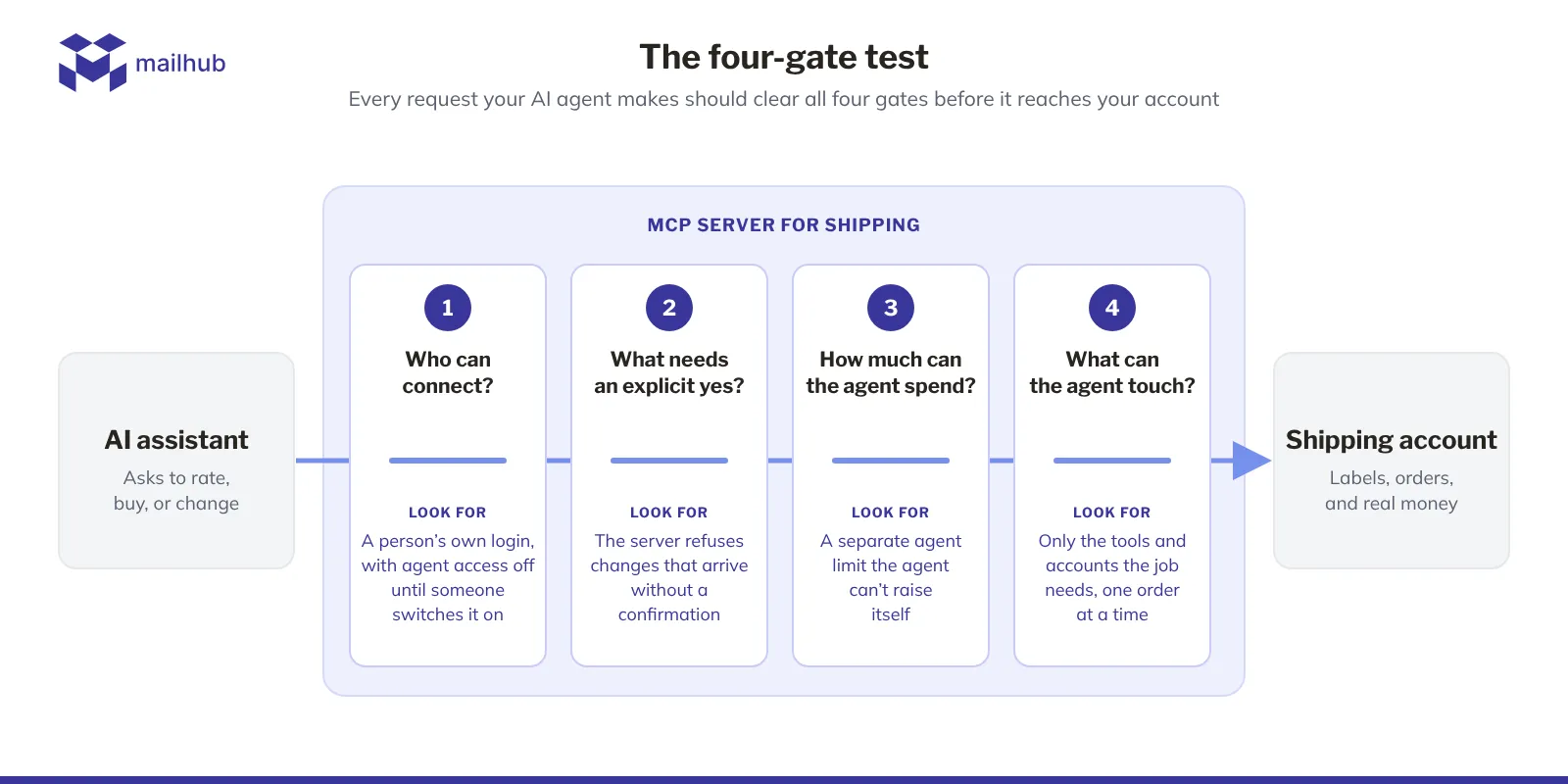
Gate 1: Who can connect, and how do they sign in?
A server that signs the agent in through a person's normal login acts with that person's permissions, so a packer's assistant can do only what the packer can.
A server reached with an API token acts with whatever that token allows, which can be most of the account, and anyone holding the token holds that power. Ask which permissions the token carries, and what a stranger could buy if it leaked.
Then check whether agent access is on by default, whether only approved AI apps can connect, and who can turn it off.
Gate 2: What needs an explicit yes, and who enforces it?
Find out which actions need a confirmation, and whether the server or the AI app enforces it. A server that documents no confirmation step of its own, like the platform server above, leaves that check to the app and its settings.
A server that refuses any changing action without an explicit confirmation on the call keeps the check on its own side, whatever the app's settings.
Then ask what that yes proves. A confirmed call proves the agent meant to act, so ask whether the app also showed a person the price first.
Gate 3: How much can the agent spend, and who can change that?
Look for a spend limit that applies to the agent separately from your normal account spending. An agent that misreads an order can buy the wrong label before anyone looks.
The safer setup is a limit the agent can't raise itself, changed only by a named person.
Also ask whether canceling a label puts the money back automatically, and plan as if it may not.
Gate 4: What can the agent touch?
List the tools, then list what’s missing. A server that only tracks parcels just looks things up; one that buys labels and changes order statuses spends money and alters your fulfillment records.
Check which accounts the agent sees, whether one call can act on many orders, and which jobs, such as pickups or customs forms, stay with a person.
Read the vendor's limits page as closely as its launch post, because the limits page is where the cost of a mistake shows.
How does our MCP server for shipping score on the four gates?
Our MCP server for shipping lets an AI assistant rate and buy labels and manage orders in your Mailhub account, acting as the signed-in user with that user's permissions. The Mailhub MCP documentation answers all four gates, and MCP is built into every Mailhub account, free, with nothing to request.
- Gate 1: You sign in as usual, no API key, and MCP is built into every account, with nothing to request or enable. The limit: Claude is the only AI app we document.
- Gate 2: Our server refuses any changing action that lacks an explicit confirmation. The limit: Our docs count that as a deliberate call, without promising a person saw a prompt.
- Gate 3: Our server won't buy a label unless the call carries an explicit confirmation, so no purchase goes through on the agent's say-so alone. The limit: There's no separate agent spend limit, so that confirmation is the check on what an agent buys.
- Gate 4: Only buying a label spends money, and each call acts on one order or label. The limit: No tool fetches carrier tracking events, and our MCP limits and current scope keep pickups, customs, batch work, and sub-accounts outside MCP.
Frequently asked questions about MCP servers for shipping
Is an MCP server an actual server?
An MCP server is an actual server in the software sense: a program that answers an AI app's requests. The MCP transports specification allows two forms. A local server is a program your AI app starts on your own computer, and a remote one is a web address the app sends each message to, run by the vendor.
Where does an MCP server for shipping run?
An MCP server for shipping runs either on your own computer or on the vendor's systems. The UPS server runs locally with your UPS credentials; Easyship offers a hosted server at mcp.easyship.com, reached with a token, and a local version. We run a remote server that you add in Claude and reach by signing in to Mailhub.
Do you need to open a port to use an MCP server for shipping?
A hosted MCP server for shipping needs no open port on your side, because your AI app connects out to the vendor's web address. A local server runs on your own computer and talks to your AI app directly, so no network port is involved. At most, a strict company firewall may need the vendor's address allowed.
Run the four gates before an MCP server for shipping can spend
The four gates turn a vendor's MCP documentation into a decision you can defend: switch agent access on, switch it on with limits, or leave it off. Start with Gate 3, the spend gate, because a wrong answer there costs money.
If our server passes, read the checks in our MCP docs to run before you first connect.
There's nothing to request: MCP is built into every Mailhub account, free, so you just sign in and connect. If you don't ship with us yet, Sign Up Free first.